Steps on the widget, not in another app
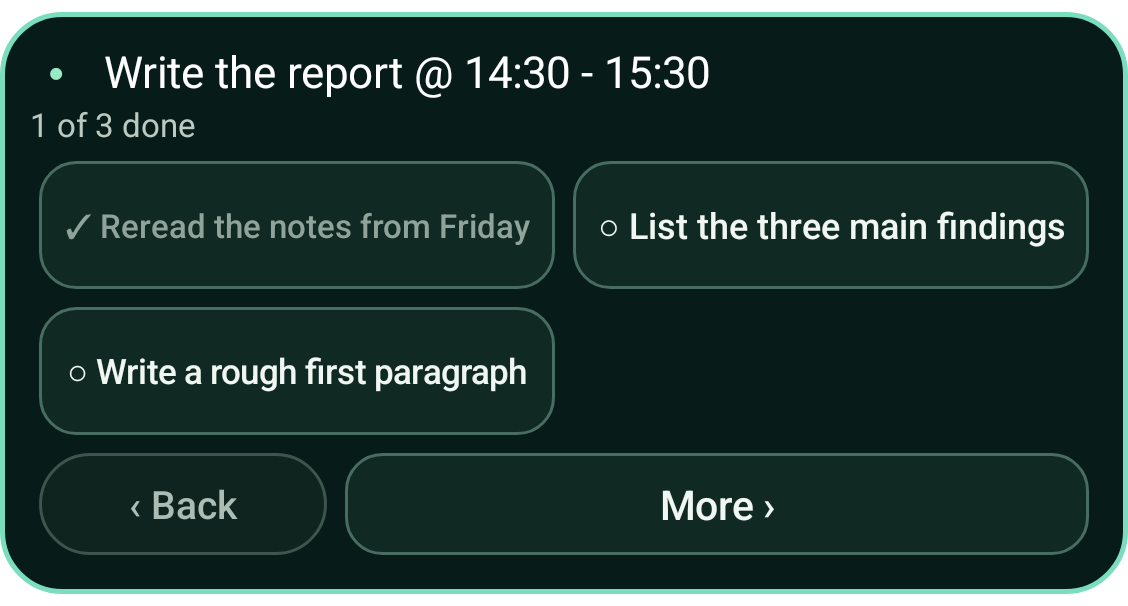
Tap Break it down on a task and your coach writes three to five concrete steps. They show on the widget itself, so you can tick them off without opening anything. When the last step is ticked, the task is done.
Small enough to actually start
Each step is something you can picture doing right now, like "Reread the notes from Friday" instead of "Research". If the steps still feel wrong, tap More and talk it through with your coach in chat.
Why breaking tasks down helps with ADHD
A vague task gives your brain nothing to grab. Being unsure where to begin is one of the most common reasons people get stuck, with or without ADHD. A concrete first step lowers the cost of starting.
It does not help with every kind of stuck. If you know exactly what to do but cannot switch into it, Grip offers other kinds of help instead.
Good to know
- Can I break down any task?
- Yes. Any activity in your plan can be broken down from the widget.
- Do I have to use the steps?
- No. They are a suggestion. You can ignore them, tick some, or mark the whole task done as usual.